Super Easy SPA with Durandal

Single Page Applications earned a reputation for being hard to structure cleanly. Before Angular 2 and React settled the conversation, the JavaScript ecosystem offered a dozen half-finished answers to the same question: how do you build a browser application that feels like a native app without turning your codebase into spaghetti? This is a guest post from my colleague Akhlesh Tiwari, who found a compelling answer in Durandal.
Introduction to Durandal
Durandal is an open-source JavaScript framework for building Single Page Applications. Rather than reinventing the wheel, it is built on three well-established libraries: jQuery for DOM manipulation and AJAX, Knockout.js for MVVM data binding, and RequireJS for asynchronous module loading. If you have worked with any of these before, Durandal will feel immediately familiar.
One of Durandal’s strengths is that it is technology-agnostic on the server side. You can pair it with ASP.NET MVC, Node.js, Ruby on Rails, or any other backend. For this tutorial we will use ASP.NET MVC4.
To get started, you can either download the VSIX template directly or install the NuGet starter kit:
Install-Package Durandal.StarterKitStep 1: Create an MVC project
Open Visual Studio and create a new ASP.NET MVC4 Internet Application named DurandalApp.
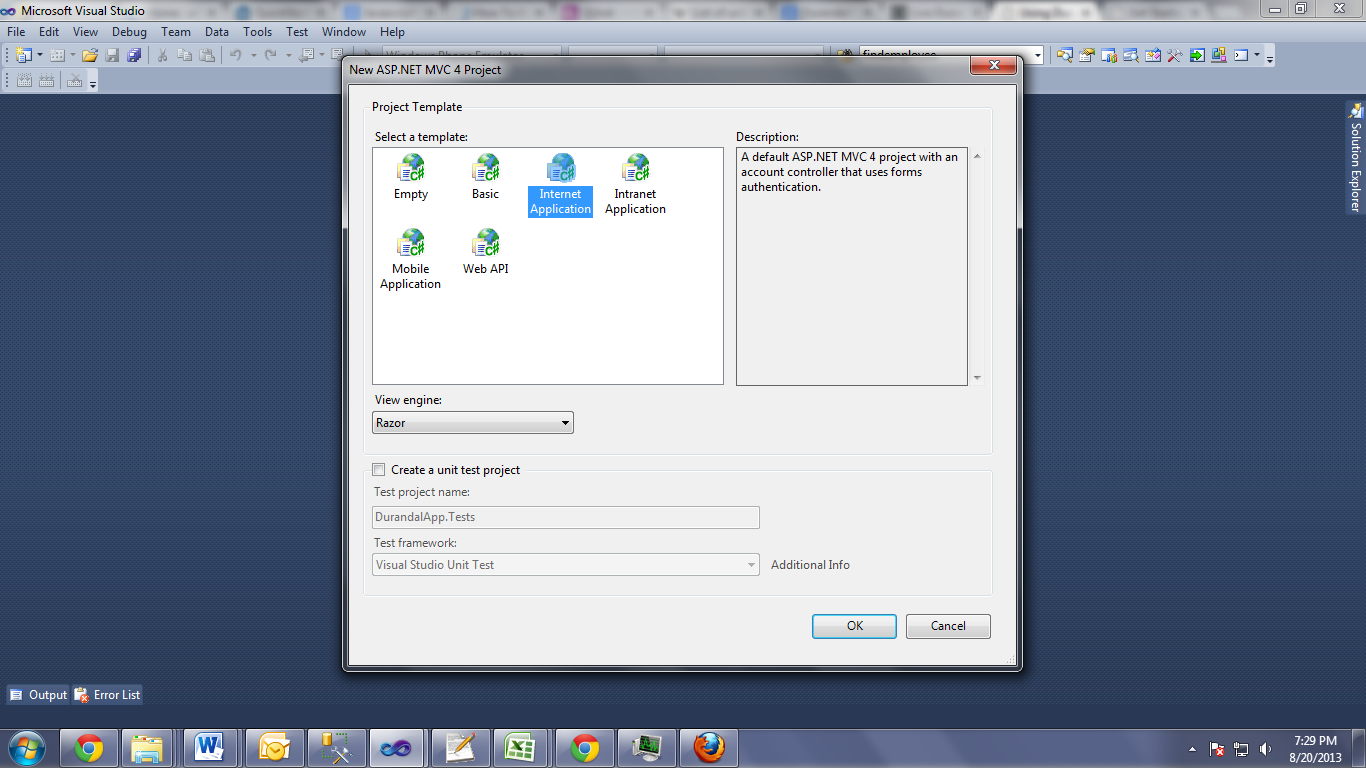
The MVC layer serves as a thin host for the SPA. The only server-side controller you really need at the start is a HomeController that returns the shell view:
namespace DurandalApp.Controllers
{
    public class HomeController : Controller
    {
        public ActionResult Index()
        {
            return View();
        }
    }
}
Step 2: Set up the folder structure
Durandal has a clear convention for organizing client-side code. Inside the project, create an App folder with the following layout:
App/
  viewmodels/
    shell.js
    home.js
  views/
    shell.html
    home.html
  main.js
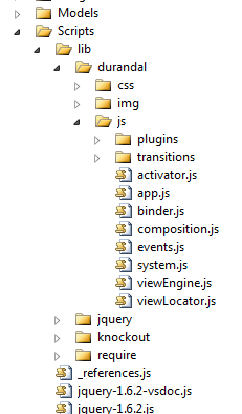
Third-party libraries live under the Scripts folder alongside the standard ASP.NET libraries:
Scripts/
  lib/
    durandal/
    require/
    knockout/
    jquery/
    bootstrap/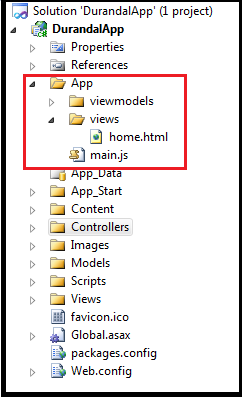
Step 3: Configure the layout and host view
The MVC layout (Layout.cshtml) is straightforward—it pulls in all the CSS dependencies and renders the body. No JavaScript references belong here; RequireJS handles all script loading from main.js.
<!DOCTYPE html>
<html lang="en">
<head>
    <link rel="stylesheet" href="Content/bootstrap/css/bootstrap.css" />
    <link rel="stylesheet" href="Content/bootstrap/css/bootstrap-responsive.css" />
    <link rel="stylesheet" href="Content/font-awesome/css/font-awesome.css" />
    <link rel="stylesheet" href="Scripts/lib/durandal/css/durandal.css" />
    <link rel="stylesheet" href="Content/site.css" />
</head>
<body>
    @RenderBody()
</body>
</html>
The single MVC view (Index.cshtml) acts as the application host. It contains a div where Durandal will inject composed views, and a single script tag that boots RequireJS and points it at main.js:
<div id="applicationHost">
    <div>
        <div>Sample App Durandal</div>
        <i></i>
    </div>
</div>

<script type="text/javascript"
        src="../Scripts/lib/require/require.js"
        data-main="/App/main">
</script>
The applicationHost div is where all of your SPA’s views will be rendered. The data-main attribute tells RequireJS which module to load first.
Step 4: Configure main.js
main.js is the application entry point. It configures RequireJS module paths so you can use short aliases instead of long relative paths, enables Durandal plugins (router, dialog, widget), and bootstraps the application by setting the root view model.
requirejs.config({
    paths: {
        'text':        '../Scripts/lib/require/text',
        'durandal':    '../Scripts/lib/durandal/js',
        'plugins':     '../Scripts/lib/durandal/js/plugins',
        'transitions': '../Scripts/lib/durandal/js/transitions',
        'knockout':    '../Scripts/lib/knockout/knockout-2.3.0',
        'bootstrap':   '../Scripts/lib/bootstrap/js/bootstrap',
        'jquery':      '../Scripts/lib/jquery/jquery-1.9.1'
    }
});

define(['durandal/system', 'durandal/app', 'durandal/viewLocator'],
    function (system, app, viewLocator) {

    system.debug(true);

    app.title = 'Durandal Starter Kit';

    app.configurePlugins({
        router: true,
        dialog: true,
        widget: true
    });

    app.start().then(function () {
        viewLocator.useConvention();
        app.setRoot('viewmodels/shell', 'entrance');
    });
});
viewLocator.useConvention() tells Durandal to look for views/home.html when the active view model is viewmodels/home.js—a clean naming convention that eliminates manual mapping.
Step 5: Create the shell
The shell acts as the master page for the SPA. It contains the static navigation and a composition placeholder where child views are rendered.
shell.js registers all application routes and activates the router:
define(['plugins/router', 'durandal/app'], function (router, app) {
    return {
        router: router,
        activate: function () {
            router.map([
                { route: '',      title: 'home',    moduleId: 'viewmodels/home',    nav: true },
                { route: 'about', title: 'about',   moduleId: 'viewmodels/about',   nav: true },
                { route: 'contact', title: 'contact', moduleId: 'viewmodels/contact', nav: true }
            ]).buildNavigationModel();

            return router.activate();
        }
    };
});
shell.html uses Knockout bindings to generate navigation links dynamically from the route configuration, and the router binding to compose the active child view:
<div>
    <div>
        <div>
            <ul data-bind="foreach: router.navigationModel">
                <li data-bind="css: { active: isActive }">
                    <a data-bind="attr: { href: hash }, html: title"></a>
                </li>
            </ul>
        </div>
    </div>

    <div data-bind="router: { transition: 'entrance' }"></div>
</div>
The foreach: router.navigationModel binding iterates over every route that has nav: true, automatically building your navigation menu. The router binding at the bottom is where Durandal swaps in the appropriate view for the current route.
Step 6: Create views and view models
Adding a new page to the application requires two files and one route entry. Here is the home page as an example.
home.js is a simple RequireJS module that exposes a view model object:
define(function (require) {
    var app = require('durandal/app');

    return {
        displayName: 'Home Page',
        showMessage: function () {
            app.showMessage('This is my first home page!');
        }
    };
});
home.html is the corresponding view, data-bound to the view model:
<div>
    <h2 data-bind="html: displayName"></h2>
    <button data-bind="click: showMessage">Click Me</button>
</div>
That is all it takes. To add an About page, you create viewmodels/about.js and views/about.html, then add one route entry to shell.js:
{ route: 'about', title: 'about', moduleId: 'viewmodels/about', nav: true }Durandal handles the rest: URL routing, view composition, and navigation state.
Wrapping up
Durandal makes building SPAs straightforward without locking you into a rigid framework. The combination of Knockout for data binding, RequireJS for module management, and Durandal’s composition engine gives you a clean, maintainable architecture that scales well as the application grows.
The mental model is simple enough to hold in your head: main.js boots the app and sets the shell as the root view model, shell.js owns the route map and top-level navigation, and every page is a matched pair of a view model and a view. Adding a new route is a two-file, one-line change. The framework’s conventions do the rest, keeping the boilerplate out of your way so you can focus on what the application actually does.
Where Durandal leads from here is worth exploring—its composition system and the lifecycle hooks it exposes (activate, canDeactivate, deactivate) give you precise control over how views transition without reaching for global state. That is a conversation for another post.